Case Summary
Case Summary
Case Summary
For this capstone I created a mobile app offering an end-to-end solution that reduces household food waste by providing tools for people to better track, understand, and use the food they already have.
For this capstone I created a mobile app offering an end-to-end solution that reduces household food waste by providing tools for people to better track, understand, and use the food they already have.
Figma, Figjam
Figma, Figjam
Tools:
Tools:
Product design, prototyping, usability test moderator
Product design, prototyping, usability test moderator
UX/UI Designer
UX/UI Designer
Job duties:
Job duties:
Role:
Role:
Timeline: 5 Weeks
Timeline: 5 Weeks
Prototyping
Product Design
UI Design
Test Moderating
UX Research
Duties:
Figma, Figjam
Tools:
UX/UI Designer
Role:
For this capstone I created a mobile app offering an end-to-end solution that reduces household food waste by providing tools for people to better track, understand, and use the food they already have.
The Problem
The Problem
The Problem
The broad challenge of solving :
The broad challenge of solving :
The broad challenge of solving :
Common weekly food waste
Emotional frustration of keeping an up-to-date inventory
Noticing invisible expiring items before its too late
Common weekly food waste
Emotional frustration of keeping an up-to-date inventory
Noticing invisible expiring items before its too late
Common weekly food waste
Emotional frustration of keeping an up-to-date inventory
Noticing invisible expiring items before its too late
Many existing tools focus on recipes or shopping lists in isolation, but few support the full lifecycle of food once it enters the home.
Many existing tools focus on recipes or shopping lists in isolation, but few support the full lifecycle of food once it enters the home.
Many existing tools focus on recipes or shopping lists in isolation, but few support the full lifecycle of food once it enters the home.
WasteNot
WasteNot
WasteNot
An end-to-end solution for seeing, using and saving your food.
An end-to-end solution for seeing, using and saving your food.
An end-to-end solution for seeing, using and saving your food.
Click Images to see Full Persona



Click Images to see Full Persona
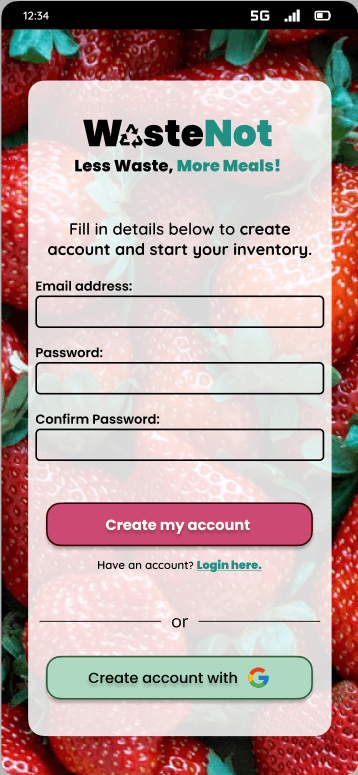
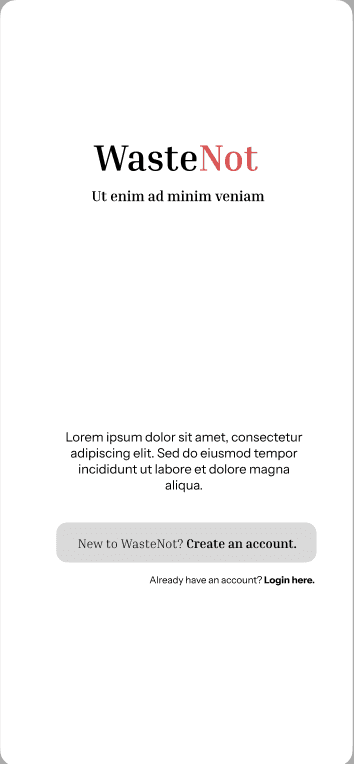
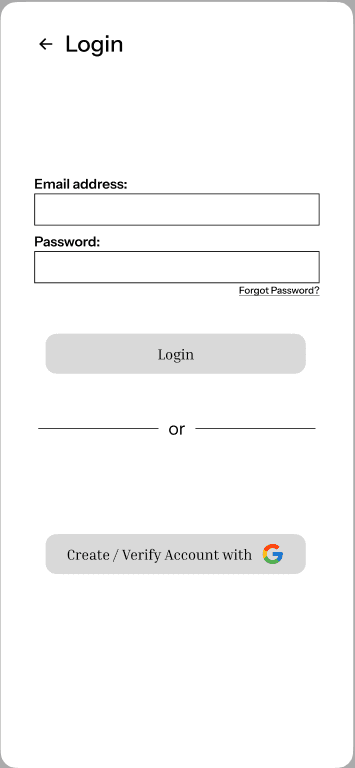
Solution: Change microcopy of CTA's so they are consistent from screen to screen.
From: "Login"
To: "Account Setup"
Solution: Change microcopy of CTA's so they are consistent from screen to screen.
From: "Login"
To: "Account Setup"
Multiple users expressed confusion about creating an account vs. logging in during the onboarding process.
Multiple users expressed confusion about creating an account vs. logging in during the onboarding process.
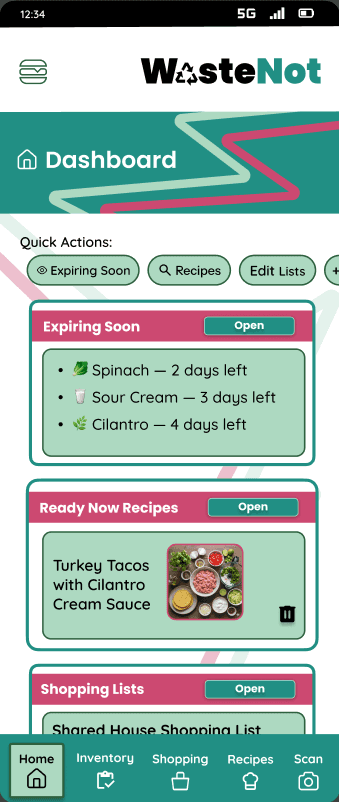
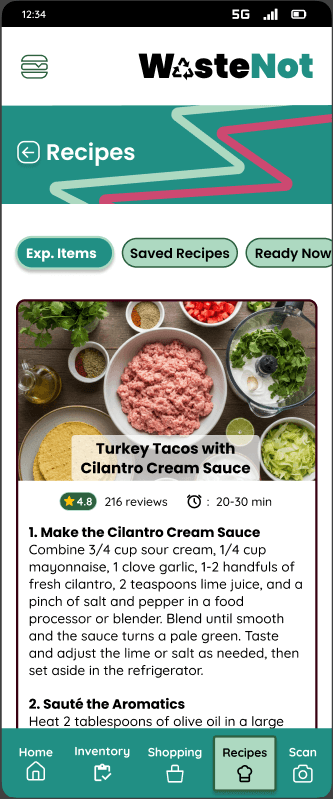
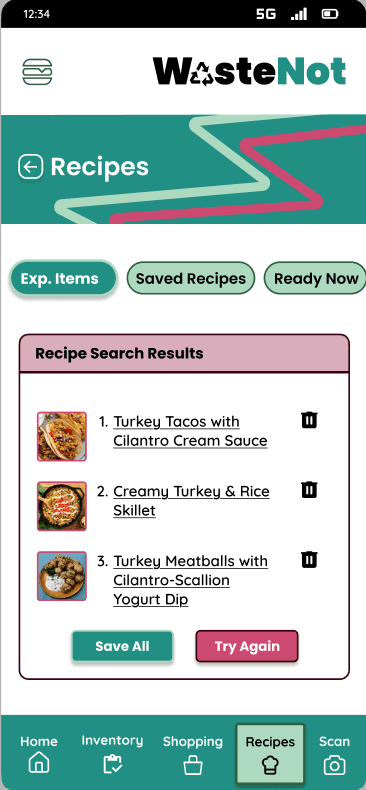
When testing between "Inventory" & "Recipe Search" tasks, one user clicked back and tried the search using the "Expiring Soon" instead of using the "Recipes" button on bottom nav bar.
When testing between "Inventory" & "Recipe Search" tasks, one user clicked back and tried the search using the "Expiring Soon" instead of using the "Recipes" button on bottom nav bar.
Solution: Integrate site navigation instructions on the home dashboard that provides immediate context first time users.
Solution: Integrate site navigation instructions on the home dashboard that provides immediate context first time users.
When testing between "Inventory" & "Recipe Search" tasks, one user clicked back and tried the search using the "Expiring Soon" instead of using the "Recipes" button on bottom nav bar.
Solution: Integrate site navigation instructions on the home dashboard that provides immediate context first time users.
(Click the link below to be directed to Affinity Mapped research insights)
Efficient inventory input through receipt scanning
Expiration tracking
Shared shopping lists syncing
Recipe recommendations prioritizing expiring inventory items
This diverse range of personalities defined an opportunity for a low-friction, non-judgmental system focused on building awareness rather than enforcing perfection. The next step was to map an end-to-end user journey supported by:
Early user issues when switching different task flows helped me understand how to better navigate their experience & also empower users to fully benefit from the product’s capabilities. This capstone strengthened my progression & confidence with:
Early user issues when switching different task flows helped me understand how to better navigate their experience & also empower users to fully benefit from the product’s capabilities. This capstone strengthened my progression & confidence with:
Early user issues when switching different task flows helped me understand how to better navigate their experience & also empower users to fully benefit from the product’s capabilities. This capstone strengthened my progression & confidence with:
One of the most valuable lessons experienced from mistakes made was:
One of the most valuable lessons experienced from mistakes made was:
One of the most valuable lessons experienced from mistakes made was:
The capstone concluded with a refined, pre-MVP prototype featuring validated core workflows and a sophisticated user guidance system informed by multiple rounds of research through usability testing
The capstone concluded with a refined, pre-MVP prototype featuring validated core workflows and a sophisticated user guidance system informed by multiple rounds of research through usability testing
The capstone concluded with a refined, pre-MVP prototype featuring validated core workflows and a sophisticated user guidance system informed by multiple rounds of research through usability testing
Efficiently conducting user research
Moderating usability tests
Translating user insights into meaningful design
Iterations that directly improve clarity and usability.
Efficiently conducting user research
Moderating usability tests
Translating user insights into meaningful design
Iterations that directly improve clarity and usability.
Efficiently conducting user research
Moderating usability tests
Translating user insights into meaningful design
Iterations that directly improve clarity and usability.
Recognizing how essential clear in‑app guidance and UX guardrails are when designing a feature‑rich solution.
Recognizing how essential clear in‑app guidance and UX guardrails are when designing a feature‑rich solution.
Recognizing how essential clear in‑app guidance and UX guardrails are when designing a feature‑rich solution.
WasteNot Prototype
A final round of feedback from my mentor uncovered opportunities for even deeper refinement for a more streamlined and supportive user journey. This led to a strategic shift in the final prototype:
A final round of feedback from my mentor uncovered opportunities for even deeper refinement for a more streamlined and supportive user journey. This led to a strategic shift in the final prototype:
A final round of feedback from my mentor uncovered opportunities for even deeper refinement for a more streamlined and supportive user journey. This led to a strategic shift in the final prototype:
Next was to refine the microcopy across specific labels for cards and folders, thus improving overall feature comprehension across the prototype.
Next was to refine the microcopy across specific labels for cards and folders, thus improving overall feature comprehension across the prototype.
Next was to refine the microcopy across specific labels for cards and folders, thus improving overall feature comprehension across the prototype.
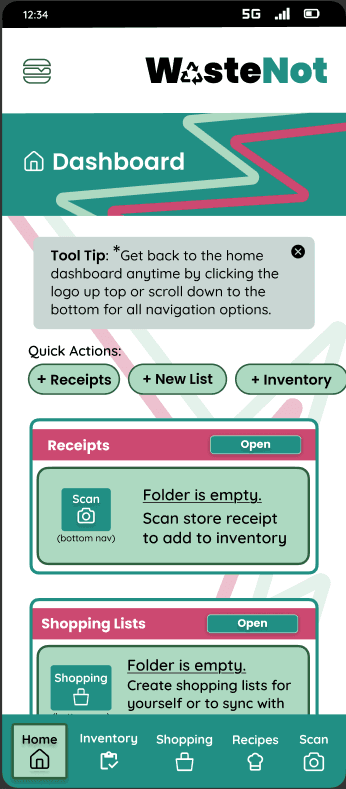
During high-fidelity design, I addressed previous navigation challenges by prioritizing the first-time user experience as a core design pillar. To bridge the gap in feature comprehension, initial iterations were made by:
During high-fidelity design, I addressed previous navigation challenges by prioritizing the first-time user experience as a core design pillar. To bridge the gap in feature comprehension, initial iterations were made by:
During high-fidelity design, I addressed previous navigation challenges by prioritizing the first-time user experience as a core design pillar. To bridge the gap in feature comprehension, initial iterations were made by:
Integrating site instructions into the onboarding process.
Integrating site instructions into the onboarding process.
Integrating site instructions into the onboarding process.
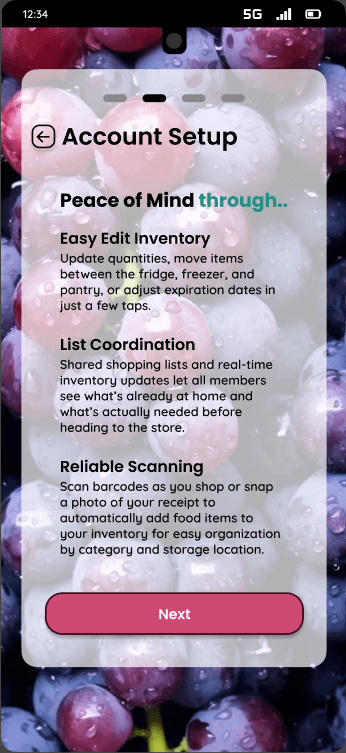
Old
New
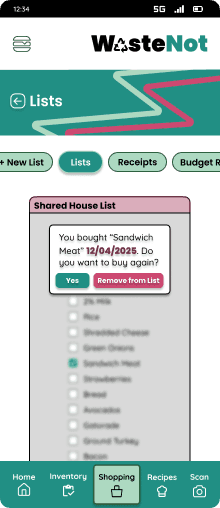
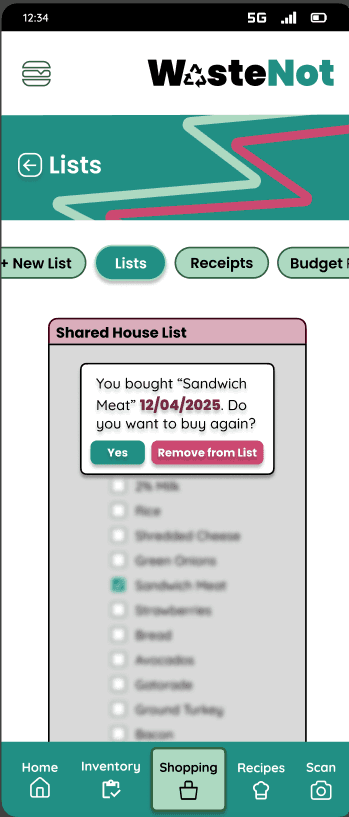
Adding targeted tooltips, like an instructional message for the "shared shopping list" feature.
Old
New
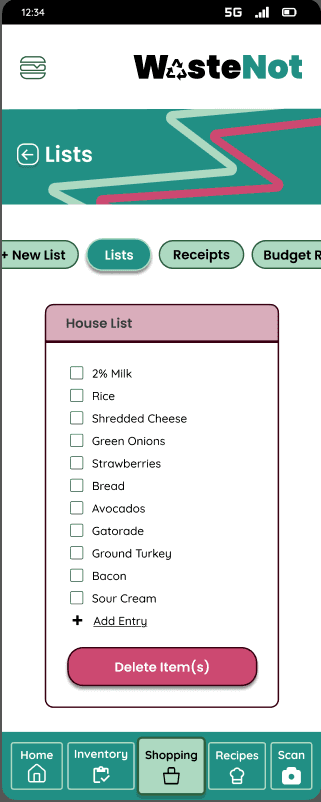
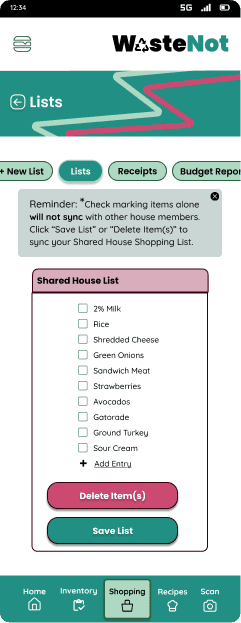
Adding targeted tooltips, like an instructional message for the "shared shopping list" feature.
Adding targeted tooltips, like an instructional message for the "shared shopping list" feature.
Old
New
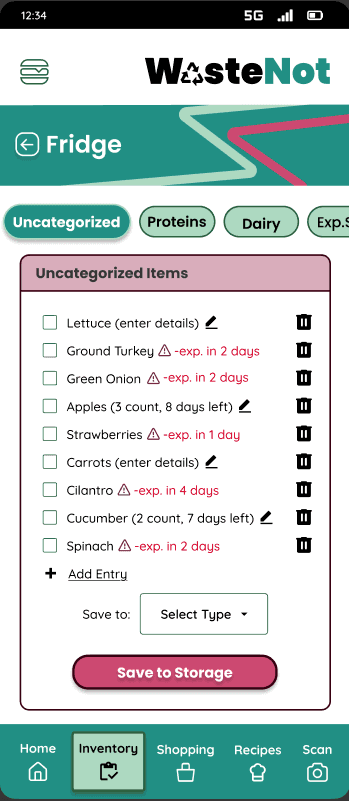
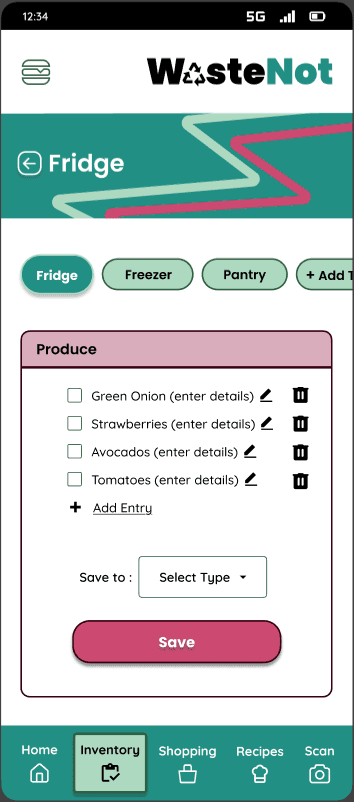
Replacing ambiguous labels with intuitive, action-oriented text to ensure task flows felt more intuitive
Replacing ambiguous labels with intuitive, action-oriented text to ensure task flows felt more intuitive
Replacing ambiguous labels with intuitive, action-oriented text to ensure task flows felt more intuitive
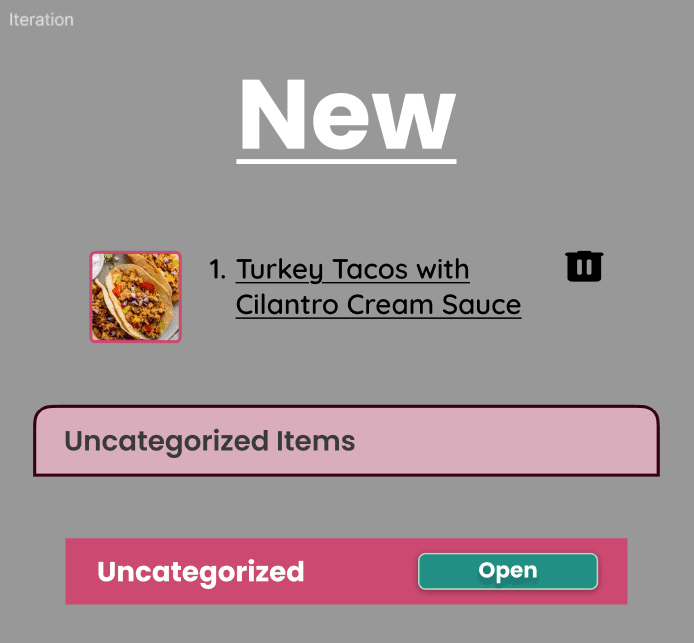
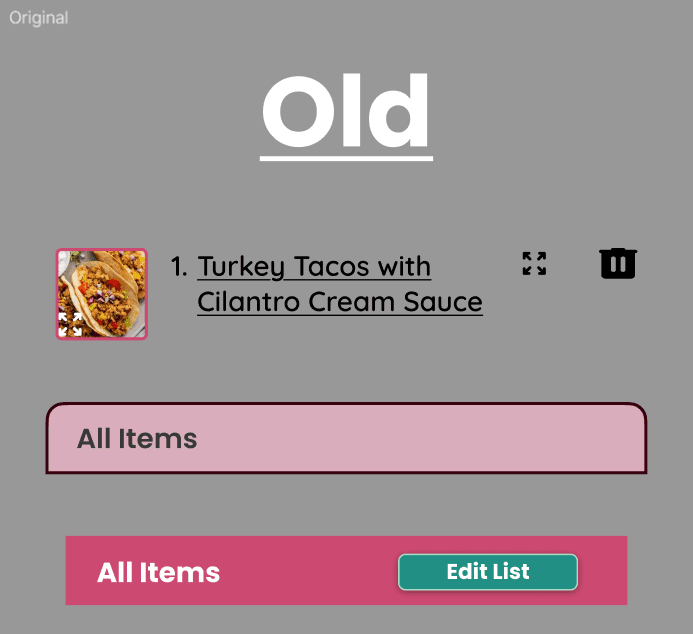
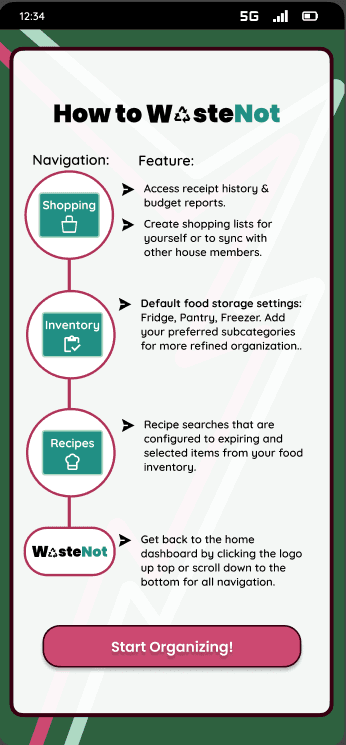
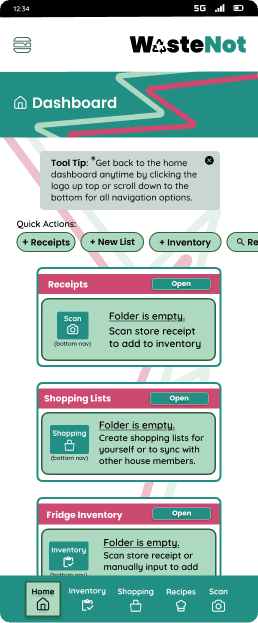
Instead of burying vital navigation guidance into a standard onboarding tutorial, instructions were integrated directly onto the home dashboard for immediate context.
Instead of burying vital navigation guidance into a standard onboarding tutorial, instructions were integrated directly onto the home dashboard for immediate context.
Instead of burying vital navigation guidance into a standard onboarding tutorial, instructions were integrated directly onto the home dashboard for immediate context.
The goal is to provide these instructions to first-time users as they explore app features so the process feels as intuitive as possible.
The goal is to provide these instructions to first-time users as they explore app features so the process feels as intuitive as possible.
The goal is to provide these instructions to first-time users as they explore app features so the process feels as intuitive as possible.
Old
Old
New
New
These early testing insights highlighted both the concept of solution, as well as areas that required refinement to ensure a smoother, more intuitive user experience.
These early testing insights highlighted both the concept of solution, as well as areas that required refinement to ensure a smoother, more intuitive user experience.
These early testing insights highlighted both the concept of solution, as well as areas that required refinement to ensure a smoother, more intuitive user experience.
Early test sessions unveiled a few usability issues with site navigation among test subjects. Some users also expressed uncertainty about how to use certain features.
Early test sessions unveiled a few usability issues with site navigation among test subjects. Some users also expressed uncertainty about how to use certain features.
Early test sessions unveiled a few usability issues with site navigation among test subjects. Some users also expressed uncertainty about how to use certain features.
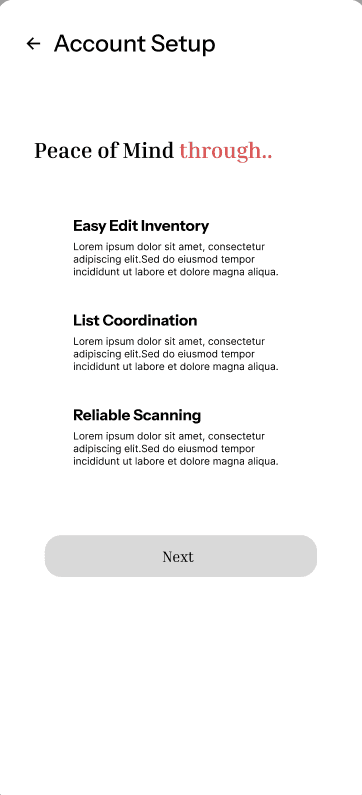
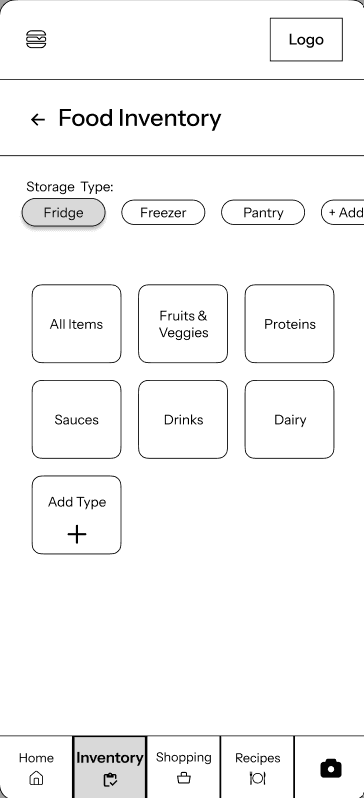
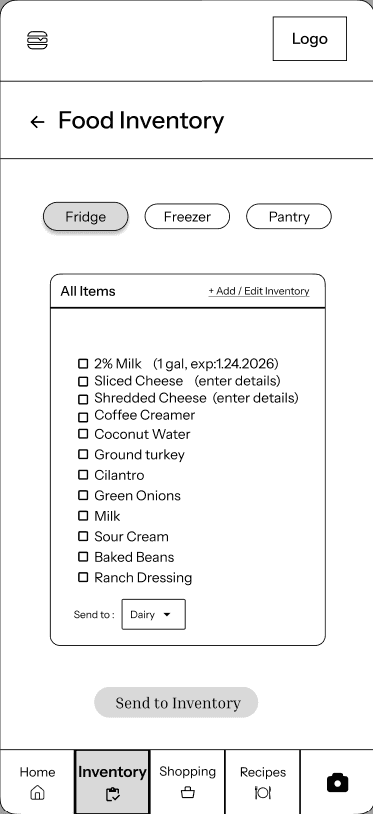
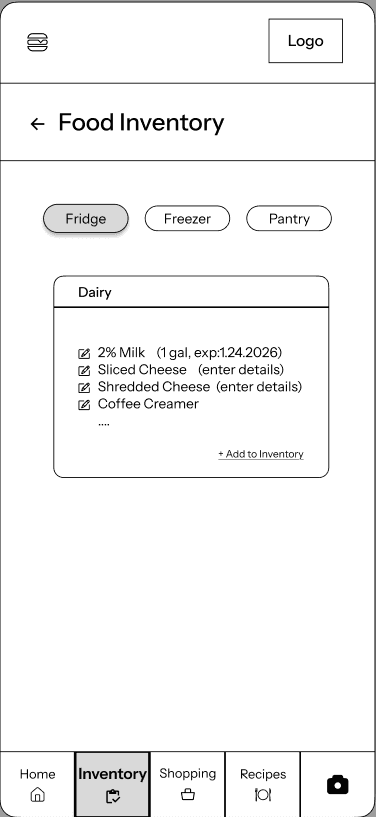
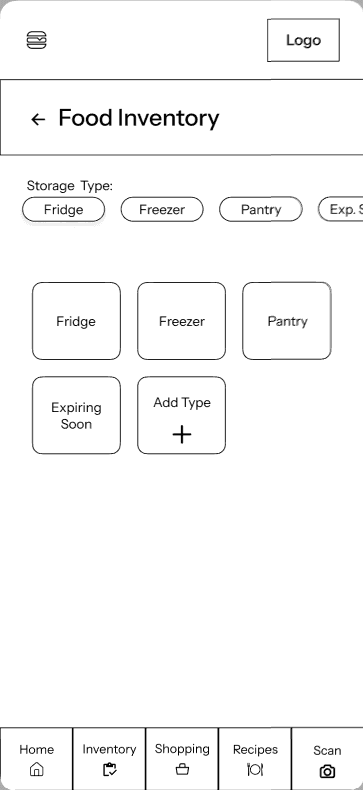
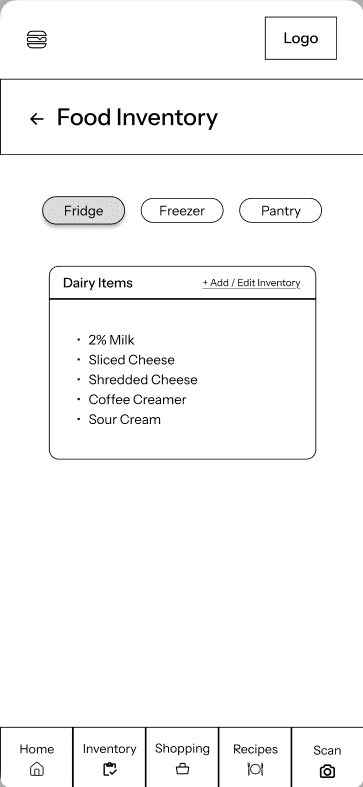
Early stages of testing mid-fidelity wireframes validated the core logic of the inventory‑tracking flow
5/5 testers completed the "Sort Inventory" task within the given time limit
Early stages of testing mid-fidelity wireframes validated the core logic of the inventory‑tracking flow
5/5 testers completed the "Sort Inventory" task within the given time limit
Despite some minor navigation issues, users still recognized the app’s potential to meaningfully reduce household food waste, reinforcing that the product concept addressed a real and relevant need.
Despite some minor navigation issues, users still recognized the app’s potential to meaningfully reduce household food waste, reinforcing that the product concept addressed a real and relevant need.
Despite some minor navigation issues, users still recognized the app’s potential to meaningfully reduce household food waste, reinforcing that the product concept addressed a real and relevant need.
Efficient inventory input through receipt scanning
Expiration tracking
Shared shopping lists syncing
Recipe recommendations prioritizing expiring inventory items
Efficient inventory input through receipt scanning
Expiration tracking
Shared shopping lists syncing
Recipe recommendations prioritizing expiring inventory items
This diverse range of personalities defined an opportunity for a low-friction, non-judgmental system focused on building awareness rather than enforcing perfection. The next step was to map an end-to-end user journey supported by:
This diverse range of personalities defined an opportunity for a low-friction, non-judgmental system focused on building awareness rather than enforcing perfection. The next step was to map an end-to-end user journey supported by:
Press Images to see Full Persona
Press Images to see Full Persona
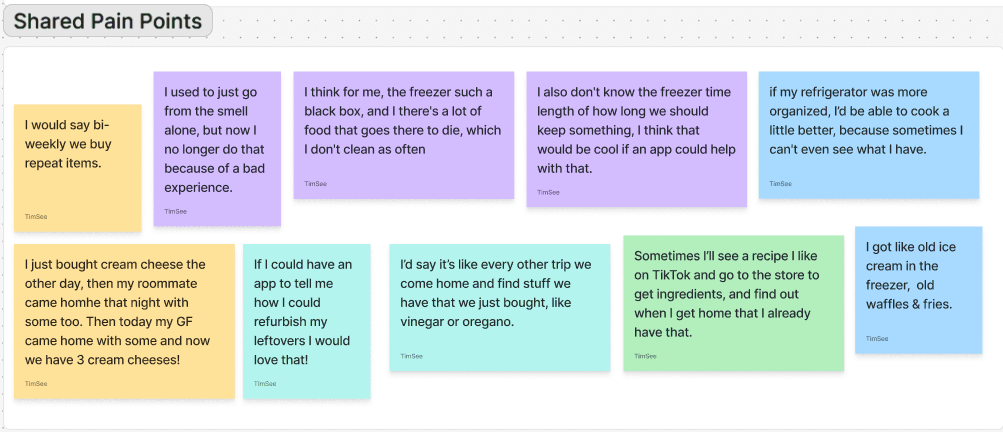
After collecting interview data, I synthesized findings into behavioral patterns, pain points, and emotional drivers that resulted in detailed personas representing a range of grocery behaviors, from careful planners to impulse buyers. This ensured the solution addressed diverse household needs.
After collecting interview data, I synthesized findings into behavioral patterns, pain points, and emotional drivers that resulted in detailed personas representing a range of grocery behaviors, from careful planners to impulse buyers. This ensured the solution addressed diverse household needs.
After collecting interview data, I synthesized findings into behavioral patterns, pain points, and emotional drivers that resulted in detailed personas representing a range of grocery behaviors, from careful planners to impulse buyers. This ensured the solution addressed diverse household needs.
Low awareness of pantry and fridge items
Duplicate purchases
Unnoticed food expiration
Ongoing cognitive burden of deciding what to cook
Low awareness of pantry and fridge items
Duplicate purchases
Unnoticed food expiration
Ongoing cognitive burden of deciding what to cook
Low awareness of pantry and fridge items
Duplicate purchases
Unnoticed food expiration
Ongoing cognitive burden of deciding what to cook
The main takeaways discovered through affinity mapping user research insights & competitive analysis revealed four core drivers of food waste:
The main takeaways discovered through affinity mapping user research insights & competitive analysis revealed four core drivers of food waste:
The main takeaways discovered through affinity mapping user research insights & competitive analysis revealed four core drivers of food waste:
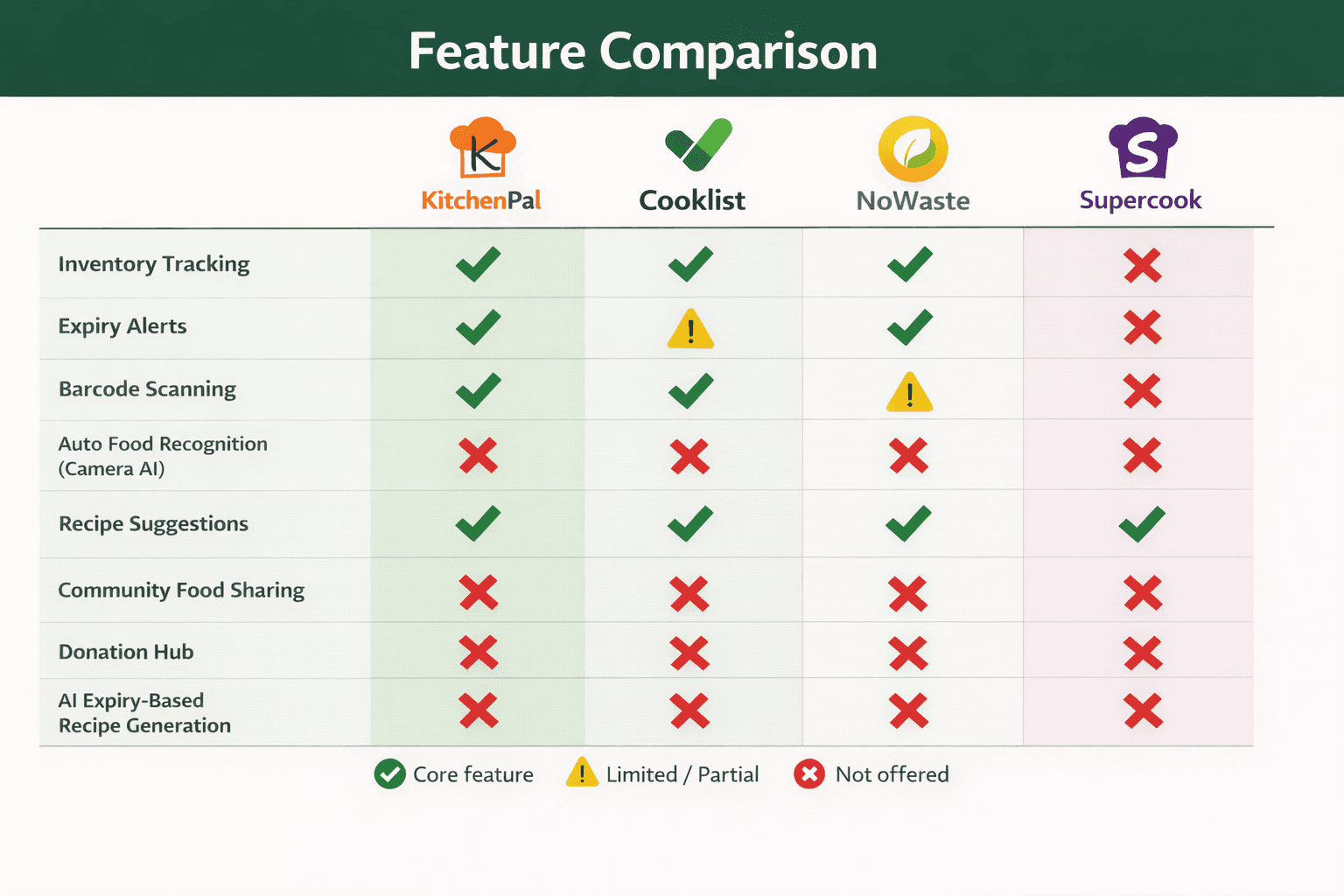
Some platforms help you track food, others help you use it, but none connect inventory awareness with timely, actionable decision-making.
Some platforms help you track food, others help you use it, but none connect inventory awareness with timely, actionable decision-making.
Some platforms help you track food, others help you use it, but none connect inventory awareness with timely, actionable decision-making.
To ground these findings in real behavior, I also interviewed heads of households to understand the root causes of mental fatigue around meal planning and food inventory tracking.
To ground these findings in real behavior, I also interviewed heads of households to understand the root causes of mental fatigue around meal planning and food inventory tracking.
To ground these findings in real behavior, I also interviewed heads of households to understand the root causes of mental fatigue around meal planning and food inventory tracking.
I conducted a competitive analysis of existing food management and grocery apps to identify gaps in how current solutions address household food waste.
I conducted a competitive analysis of existing food management and grocery apps to identify gaps in how current solutions address household food waste.
I conducted a competitive analysis of existing food management and grocery apps to identify gaps in how current solutions address household food waste.
Learning Opportunities
Learning Opportunities
Process
Process
Process
Enhance Mindfulness, Prevent Wastefulness
Enhance Mindfulness, Prevent Wastefulness
Enhance Mindfulness, Prevent Wastefulness
Identify Critical Waste Drivers
Identify Critical Waste Drivers
Refined UX Through Iterative Testing
Uncovering Usability Issues
Uncovering Usability Issues
Refined UX Through Iterative Testing
Refined UX Through Iterative Testing
Closing Insights
Closing Insights
Closing Insights
Multiple users expressed confusion about creating an account vs. logging in during the onboarding process.
Solution: Change microcopy of CTA's so they are consistent from screen to screen.
From: "Login"
To: "Account Setup"
Identify Critical Waste Drivers
Uncovering Usability Issues
WasteNot Prototype
Solution: Change microcopy of CTA's so they are consistent from screen to screen.
From: "Login"
To: "Account Setup"
Multiple users expressed confusion about creating an account vs. logging in during the onboarding process.
When testing between "Inventory" & "Recipe Search" tasks, one user clicked back and tried the search using the "Expiring Soon" instead of using the "Recipes" button on bottom nav bar.
Solution: Integrate site navigation instructions on the home dashboard that provides immediate context first time users.